
Appearance
Settings
Sizing
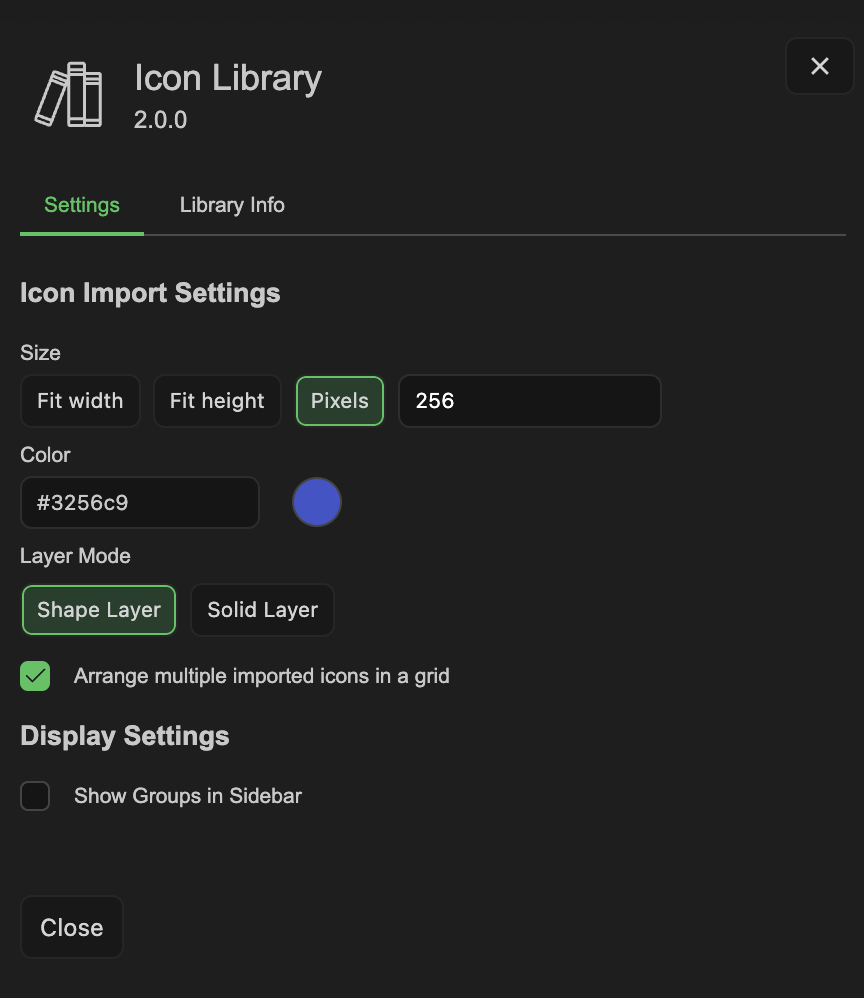
There are three options for sizing of the icon when imported.
- Fit to Width - Scales the icon to match the comp's or document's width
- Fit to Height - Scales the icon to match the comp's or document's height
- Pixel Size - Specify a fixed width in pixels in the text field to the right
Color & Color Picker
Specify the hex code of what color you'd like icon to import with. Click the circle thumbnail to launch a color picker pop-up if you'd rather instead of specifying a hex code.
Layer Mode (After Effects Only)
Choose between masks on a solid layer, or shaper layer paths as the source of your icon
Arrange Imported Icons in a Grid
When enabled, importing multiple icons at once will automatically arrange them in a grid layout. The number of columns is determined by the number of icons being imported.
Show Groups in Sidebar
When enabled, the sidebar displays each library's icon groups as expandable categories, letting you browse by type rather than scrolling the full set.